

Invoice Field Reference
Every field on the invoice editor — what it means, whether it is required, and the values it accepts.
This page documents every field on the invoice editor, grouped by the section it appears in. Use it as a lookup while building a document. For a step-by-step walkthrough instead, see Create or Edit an Invoice.
Note
Fatorly validates each document against the UAE PINT (PINT AE) rules before it can be submitted. Fields marked Required must be present; several others are conditionally required depending on the tax category, document type, or whether you start filling a related group.
The editor is organized into a header, a line-items table, four collapsible sections (Transaction Type, Charges & Allowances, References & Delivery, Payment & Notes), and a live Totals panel.
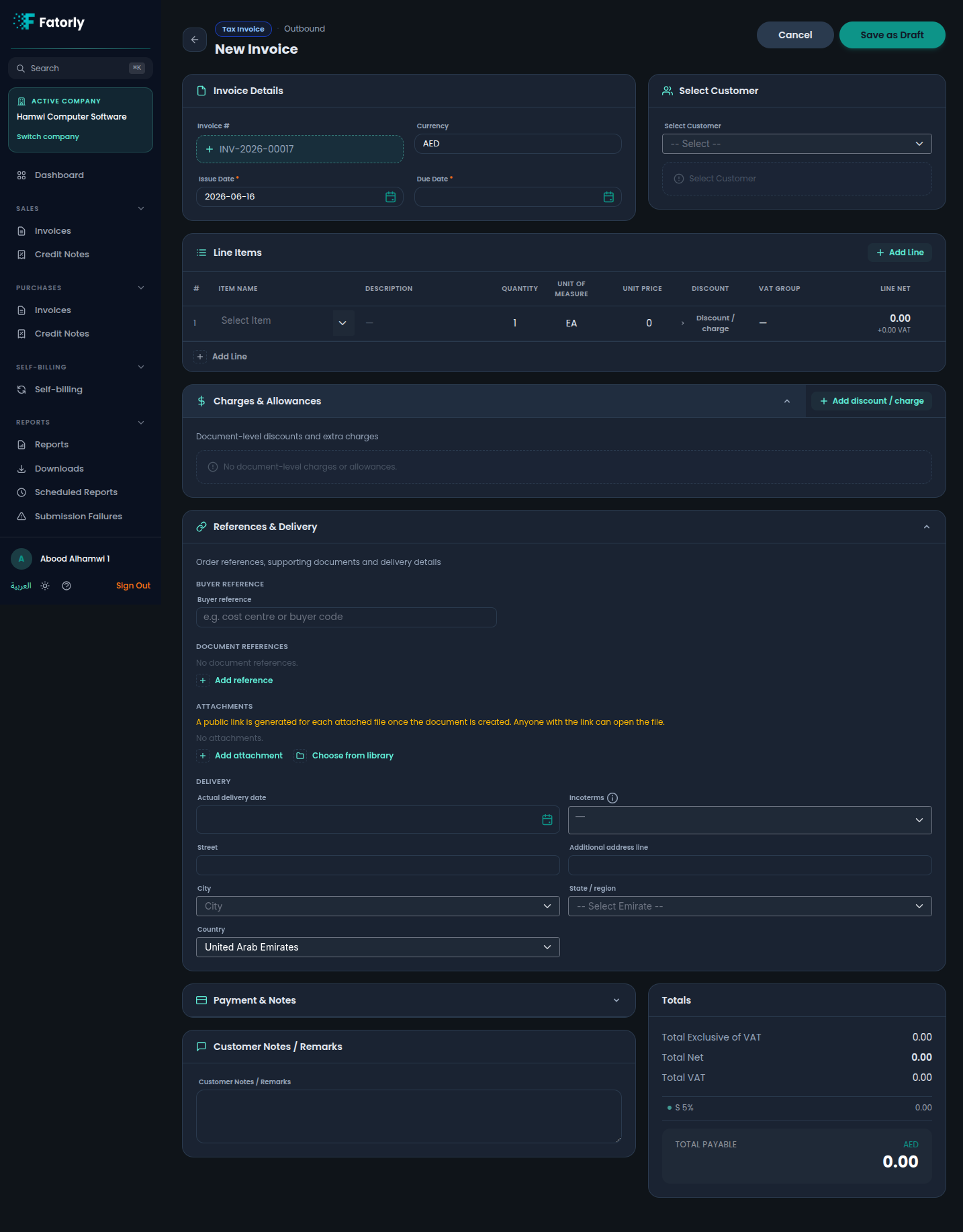
1. Document header (Invoice Details)
| Field | Required | Control | Allowed / default | Notes |
|---|---|---|---|---|
| Invoice # | Yes | Auto / read-only | From your number series | Assigned automatically when creating; cannot be edited afterwards. |
| Currency | Yes | Text / selector | Defaults to AED | The document currency. |
| Issue Date | Yes | Date picker | Defaults to today | The date the document is issued. |
| Due Date | Conditional | Date picker | — | Expected for invoices; optional for credit notes. |
| Tax Currency | Conditional | Text / read-only | Defaults to AED | Shown automatically when the document currency is not AED. UAE VAT law requires VAT amounts to also be expressed in AED; this field records the tax-reporting currency. |
| Currency Exchange Rate | Conditional | Number | Up to 6 decimal places | Required when the document currency is not AED. The rate used to convert the document currency into AED. |
| VAT Point Date | Optional | Date picker | — | The date on which VAT becomes due, if different from the issue date (BT-7). Must fall before the issue date. Not allowed on credit notes. |
Supplier fields (from Company Profile)
The following supplier field is configured once in Settings → Company Configuration → General and is automatically emitted on every invoice you create.
| Field | Required | Control | Notes |
|---|---|---|---|
| Company Legal Form | No | Text (Company Profile) | The supplier's legal form, e.g. "Merchant", "LLC" (IBT-033). Set on the Company Profile General tab; cannot be edited per-invoice. |
2. Counterparty & credit-note reference
| Field | Required | Control | Allowed / default | Notes |
|---|---|---|---|---|
| Customer / Vendor | Expected | Searchable dropdown | From your Customers / Vendors | The buyer (sales) or supplier (purchase / self-billing). Selecting one fills its name, TRN, and address. |
| Referenced Invoice | Yes (credit notes) | Text | — | The number of the invoice this credit note corrects. |
| Preceding Invoice Date | No | Date picker | — | The issue date of the referenced invoice. |
| Contact Name | No | Text | — | The name of the contact person at the counterparty. Emitted on the invoice under the party's address block. |
| Postal Code | No | Text | — | Postal / ZIP code for the counterparty address. |
| Address Line 2 | No | Text | — | Second line of the counterparty address (suite, floor, building name, etc.). |
| State / Emirate (Country Subentity) | No | Dropdown | UAE emirates or free text | The state, emirate, or region of the counterparty address. |
Warning
A Tax Invoice requires a counterparty that has a VAT TRN. A Commercial Invoice is for counterparties without a TRN. The customer/vendor list is filtered accordingly.
3. Transaction Type (UAE special scenarios)
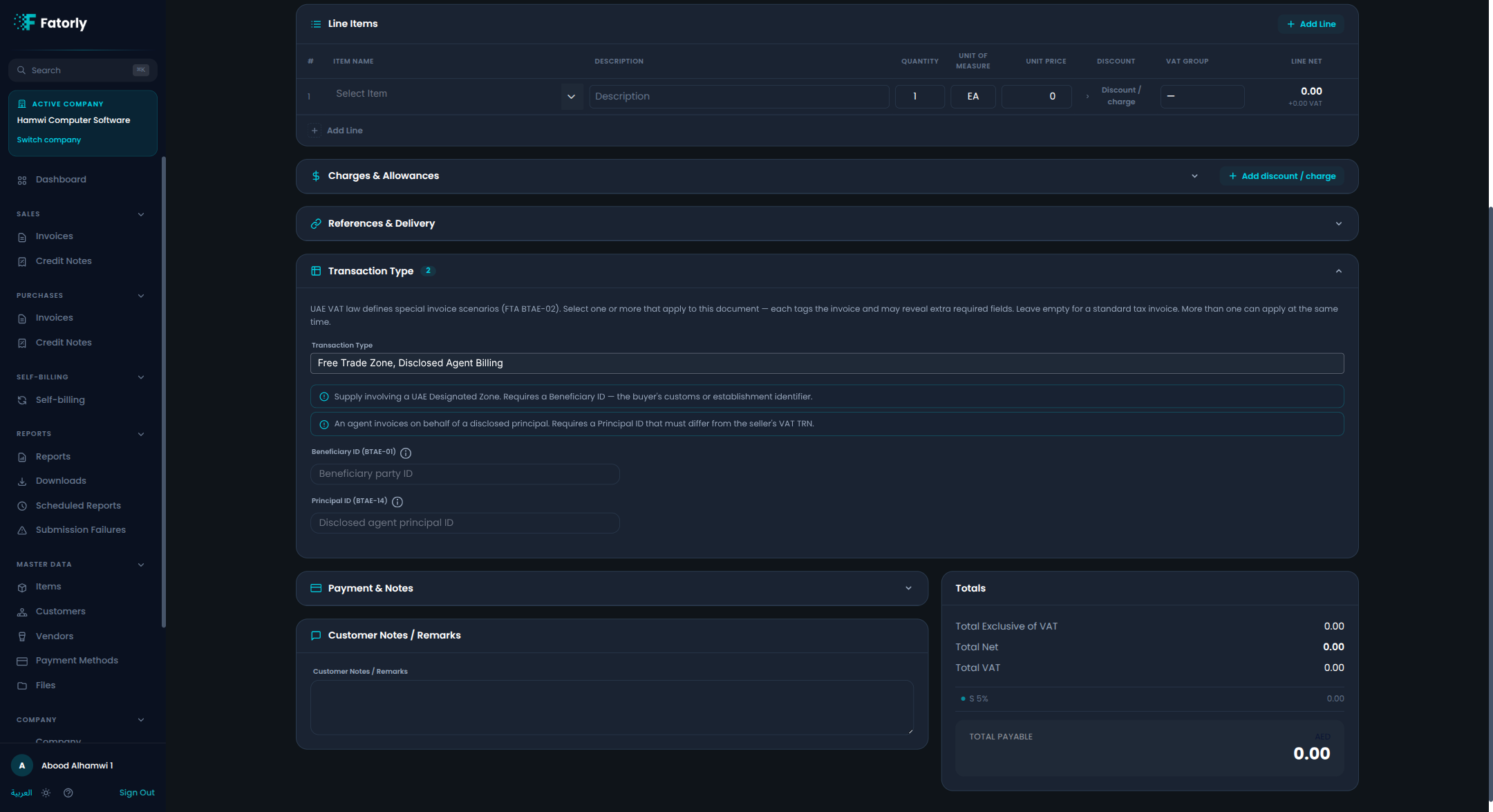
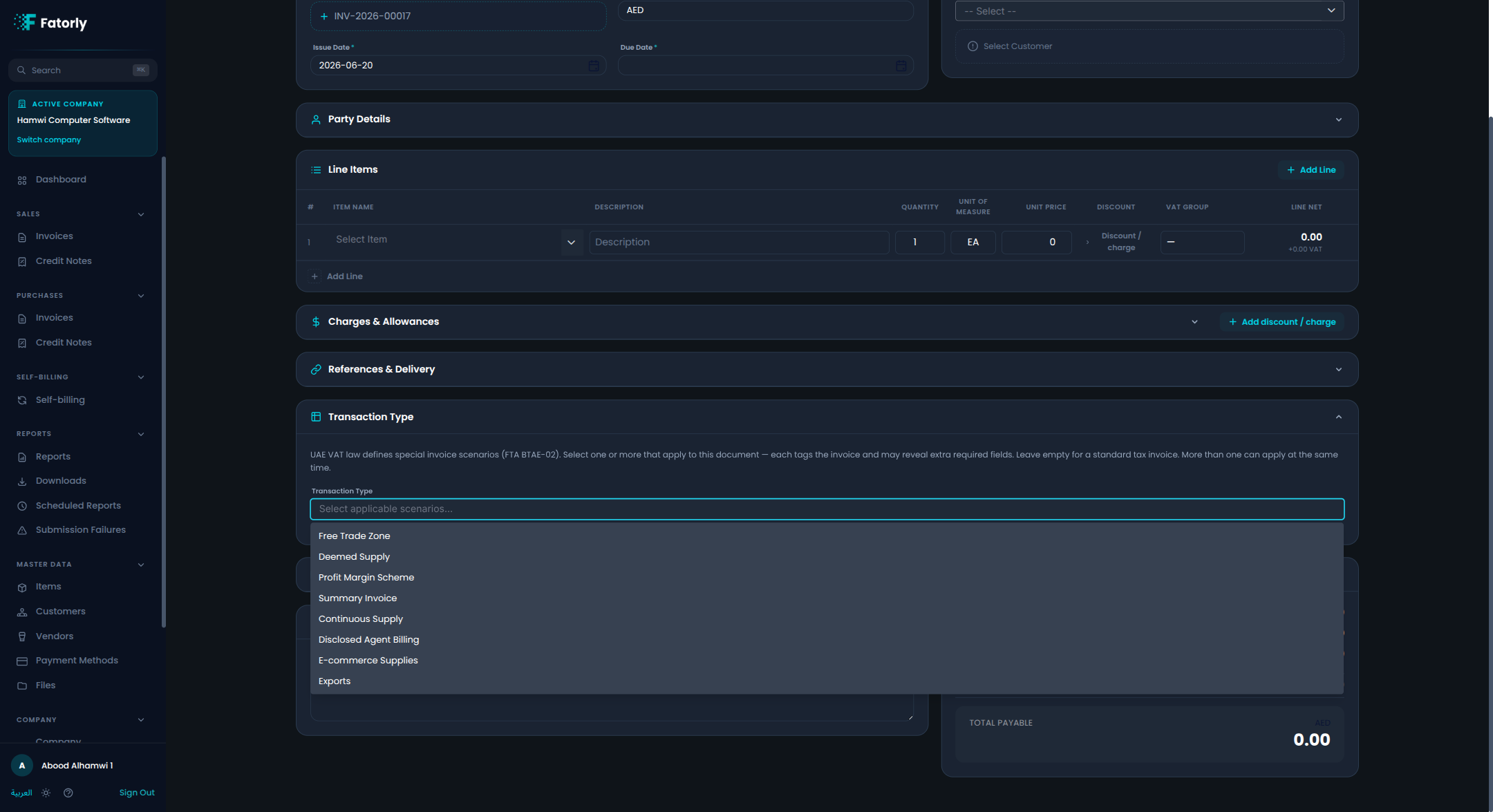
UAE VAT law (FTA PINT-AE code BTAE-02) recognises eight special invoice scenarios. Use the collapsible Transaction Type section to select the ones that apply. Each scenario tags the invoice and reveals the extra fields it legally requires. Leave the section empty for a standard tax invoice; more than one scenario can apply simultaneously.
Scenarios
| Field | Required | Control | Allowed / default | Notes |
|---|---|---|---|---|
| Free Trade Zone | Conditional | Checkbox / toggle | — | Supply involving a UAE Designated Zone. Selecting this reveals the Beneficiary ID field (the buyer's customs or establishment identifier), which is required. |
| Deemed Supply | Conditional | Checkbox / toggle | — | A supply treated as made without consideration. When selected, payment means and due date are not required. |
| Profit Margin Scheme | Conditional | Checkbox / toggle | — | VAT is charged on the profit margin only (e.g. used goods). All line tax categories must use the margin-scheme VAT category when this is selected. |
| Summary Invoice | Conditional | Checkbox / toggle | — | One invoice covering multiple supplies over a period. Requires the Billing Period start/end and the Frequency of Billing fields. |
| Continuous Supply | Conditional | Checkbox / toggle | — | An ongoing supply billed periodically. Requires the Frequency of Billing field. |
| Disclosed Agent Billing | Conditional | Checkbox / toggle | — | An agent invoices on behalf of a disclosed principal. Requires the Principal ID field, which must differ from the seller's VAT TRN. |
| E-commerce Supplies | Conditional | Checkbox / toggle | — | Supply made via an e-commerce platform. Requires the delivery address fields (under References & Delivery). |
| Exports | Conditional | Checkbox / toggle | — | Supply exported outside the UAE. Requires the delivery address with a non-UAE country. |
Dependent fields
The following fields appear only when the relevant scenario is selected.
| Field | Required | Control | Allowed / default | Notes |
|---|---|---|---|---|
| Beneficiary ID | Conditional | Text | — | Shown for Free Trade Zone. The buyer's customs establishment or FTZ participant identifier. Required when the scenario is active. |
| Principal ID | Conditional | Text | — | Shown for Disclosed Agent Billing. The VAT registration number (TRN) of the principal on whose behalf the agent is billing. Must differ from the seller's own TRN. |
| Frequency of Billing | Conditional | Dropdown | DLY Daily · WKY Weekly · Q15 Fortnightly · MTH Monthly · Q45 Every 45 days · Q60 Every 60 days · QTR Quarterly · YRL Yearly · HYR Half-yearly · OTH Other | Required for Summary Invoice and Continuous Supply. When OTH is selected, a Note explaining the frequency is required. |
| Billing Period Start | Conditional | Date picker | — | The start date of the billing period. Required for Summary Invoice. |
| Billing Period End | Conditional | Date picker | — | The end date of the billing period. Required for Summary Invoice. |
4. Line items
Each row in the Line Items table is one invoiced product or service.
| Field | Required | Control | Allowed / default | Notes |
|---|---|---|---|---|
| Item Name | Yes | Searchable dropdown / text | From your item catalog | Selecting a catalog item prefills its name, unit of measure, unit price, and its default tax category and classification. |
| Description | No | Text | — | Optional free-text line description. |
| Quantity | Yes | Number | Defaults to 1 | Number of units. |
| Unit of Measure | Yes | Dropdown | Defaults to EA | UN/CEFACT unit code (e.g. EA, KGM, HUR). |
| Unit Price | Yes | Number | — | Price per unit, before tax. |
| Discount / charge | No | Inline editor | — | Per-line allowance(s) or charge(s) — see the table below. |
| VAT Group | Yes | Dropdown | S Z E O AE L | Sets the line's tax category and rate (see VAT categories). New lines default to the 5% standard group. |
| Exemption Reason | Conditional | Dropdown | FTA exemption reason codes | Shown and required only when the VAT category is E (Exempt). |
| Line Net | — | Calculated | — | Quantity × Unit Price, minus allowances plus charges. |
Per-line allowances & charges
Opened from the Discount / charge button on a line.
| Field | Required | Control | Notes |
|---|---|---|---|
| Allowance / Charge | Yes | Toggle | Whether the amount reduces (allowance) or increases (charge) the line. |
| Amount | Yes | Number | The allowance or charge amount. |
| Reason | No | Text | Free-text reason. |
| Reason code | No | Text | Standard reason code. |
Line item identifiers
Per-line product identifiers, used by the buyer's systems and standards bodies.
| Field | Required | Control | Notes |
|---|---|---|---|
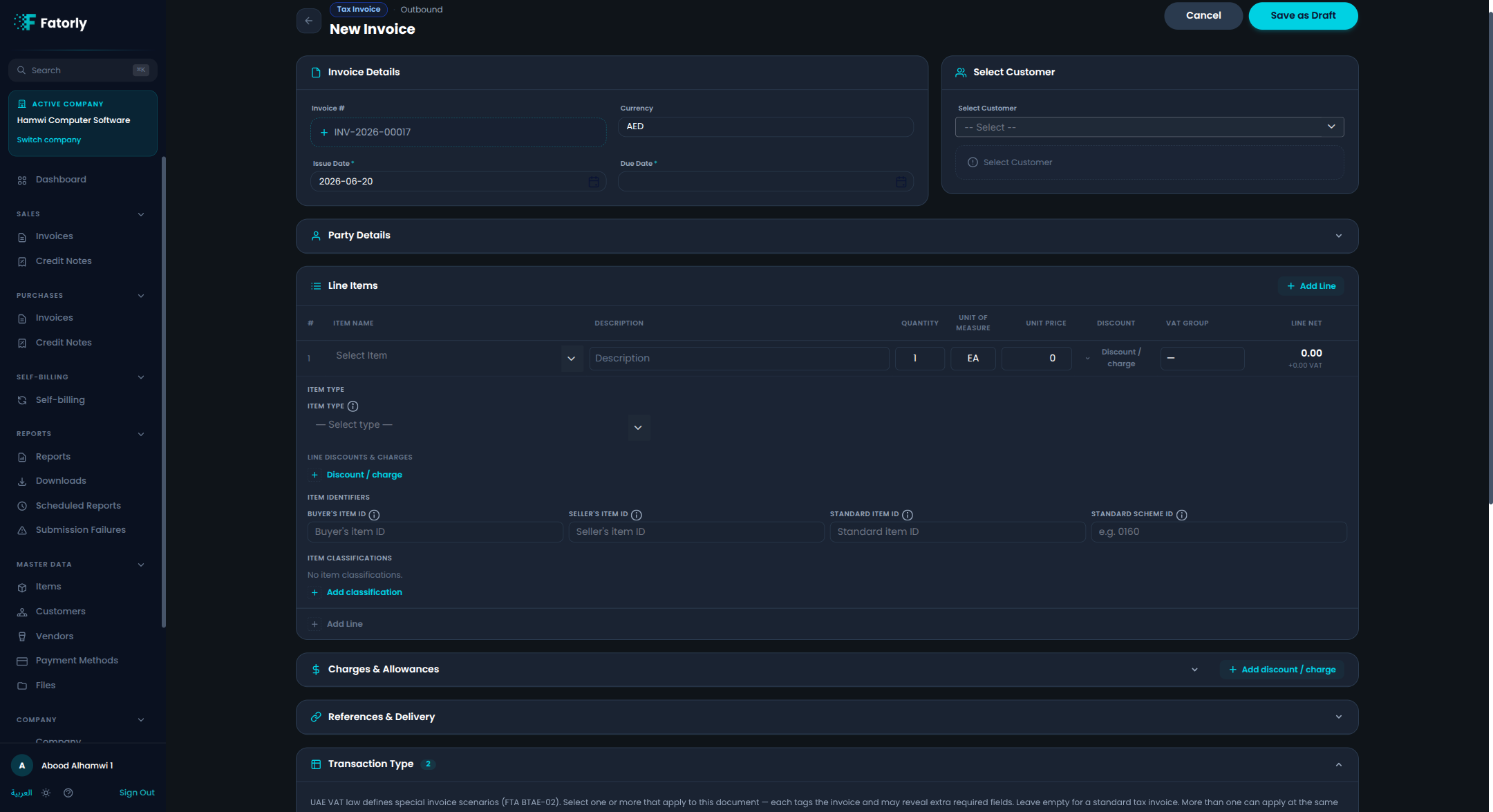
| Buyer's item ID | No | Text | The item's identifier in the buyer's catalogue (BT-156). |
| Seller's item ID | No | Text | The item's identifier in the seller's catalogue (BT-155). |
| Standard item ID | No | Text | A registered standard identifier such as a GTIN barcode (BT-157). |
| Standard scheme ID | No | Text | The scheme of the standard ID (BT-157-1). Use 0160 for a GTIN / GS1 number. |
Item type & commodity codes
Per-line fields that classify whether the line is a good or a service and supply the commodity / service accounting code required for certain tax treatments.
| Field | Required | Control | Allowed / default | Notes |
|---|---|---|---|---|
| Item Type | No | Dropdown | G Goods · S Services · B Both | Drives which commodity codes are required. When set to S or B, a Service Accounting Code is expected. When set to G or B on a reverse-charge (AE) line, a Goods Nature Code is expected. |
| Service Accounting Code (SAC) | Conditional | Text | — | Required when Item Type is S (Services) or B (Both). A UN/SPSC or equivalent code identifying the type of service. |
| Goods Nature Code | Conditional | Text | — | Required for reverse-charge (AE) lines involving goods. Identifies the nature of the goods (e.g. gold, diamonds, electronic devices) per FTA guidance. |
Item classifications (repeatable)
Per-line commodity classification codes.
| Field | Required | Control | Allowed | Notes |
|---|---|---|---|---|
| Code | Per row | Text | — | The goods/services code within the chosen scheme (e.g. a Harmonized System tariff code). |
| List (scheme) | Per row | Dropdown | Valid UNTDID 7143 code | The classification scheme the code belongs to — e.g. HS (Harmonized System), TSR (UNSPSC), SRV, STJ. |
| Version | No | Text | — | The scheme version, if relevant. |
5. Charges & Allowances (document level)
A collapsible section for discounts and charges that apply to the whole document (not a single line). Repeatable.
| Field | Required | Control | Allowed / default | Notes |
|---|---|---|---|---|
| Allowance / Charge | Yes | Toggle | — | Whether the amount reduces or increases the document total. |
| Amount | Yes | Number | — | The allowance or charge amount. |
| Reason | No | Text | — | Free-text reason. |
| Code | No | Text | — | Standard reason code. |
| Tax Category | Yes | Dropdown | S E O AE Z L, default S | The VAT category the allowance/charge is taxed under. |
| Tax Rate | Yes | Number | Default 5 | The VAT rate (%). |
| Exemption Reason | Conditional | Dropdown | FTA exemption reason codes | Required when the Tax Category is E and the amount is greater than zero. |
6. References & Delivery
A collapsible section for related documents and delivery details.
Buyer reference
| Field | Required | Control | Notes |
|---|---|---|---|
| Buyer reference | No | Text | A buyer-side reference such as a cost centre or buyer code. |
Document references (repeatable)
| Field | Required | Control | Allowed | Notes |
|---|---|---|---|---|
| Reference type | Yes | Dropdown | Purchase Order, Sales Order, Contract, Project, Despatch, Receipt | The kind of document this reference points to. |
| Reference | Yes | Text | — | The reference number/identifier. |
| Issue date | No | Date picker | — | The referenced document's date. |
| Scheme ID | No | Text | — | An optional scheme for the reference. |
Attachments (repeatable)
| Field | Required | Control | Notes |
|---|---|---|---|
| Document ID | No | Text | An identifier for the attached document. |
| File | No | Library picker / upload / URL | Attach a file from your Files library, upload a new one, or provide an external URL. |
Warning
A public link is generated for each attached file once the document is created. Anyone with the link can open the file.
Delivery
| Field | Required | Control | Allowed / default | Notes |
|---|---|---|---|---|
| Actual delivery date | No | Date picker | — | When the goods/services were delivered. |
| Incoterms | No | Dropdown | EXW FCA CPT CIP DAP DPU DDP FAS FOB CFR CIF | International commercial delivery terms. |
| Street | No | Text | — | Delivery street address. |
| Additional address line | No | Text | — | Second address line. |
| City | No | Searchable dropdown | — | Delivery city. |
| State / region | No | Dropdown | UAE emirates | Delivery emirate / region. |
| Country | Conditional | Dropdown | ISO country, default AE | Required once any delivery address field is filled. |
7. Payment & Notes
A collapsible section for payment details and notes.
| Field | Required | Control | Allowed | Notes |
|---|---|---|---|---|
| Payment Method | No | Dropdown | From your Payment Methods | How the invoice is to be paid. |
| Payment Terms | No | Dropdown | Due on Receipt, COD, Net 7/15/30/45/60/90 | The agreed payment terms. |
| Bank Account / IBAN | Conditional | Text | — | Supplier bank account or IBAN for credit-transfer payment (cbc:ID under cac:FinancialAccount). Required under UAE rules when the payment method is bank/credit transfer (code 30). |
| Prepaid Amount | No | Number | — | Amount already paid in advance (BT-113). Reduces the final amount payable on the invoice. |
| Customer Notes / Remarks | No | Text area | — | Free-text notes shown on the document. |
8. Totals
The Totals panel is calculated automatically and is read-only.
| Value | Notes |
|---|---|
| Total Exclusive of VAT | Sum of line nets before document allowances/charges. |
| Total Net | Net after document-level allowances and charges. |
| Total VAT | Total tax, with a per-category breakdown (e.g. S 5%). |
| Total Payable | Grand total including VAT, in the document currency. |
VAT categories
| Code | Rate | Meaning |
|---|---|---|
S | 5% | Standard-rated |
Z | 0% | Zero-rated |
E | 0% | Exempt — requires an exemption reason |
O | 0% | Out of scope |
AE | 0% | Reverse charge |
L | 0% | Special / other |
Validation rules to remember
Warning
- Exemption reason is required whenever the tax category is
E— on a line and on a document-level allowance/charge. - Reverse-charge (
AE) lines require a Standard item ID with scheme0160. - A line's classification scheme (List) must be a valid UNTDID 7143 code.
- A Tax Invoice requires a counterparty with a VAT TRN; a Commercial Invoice does not.