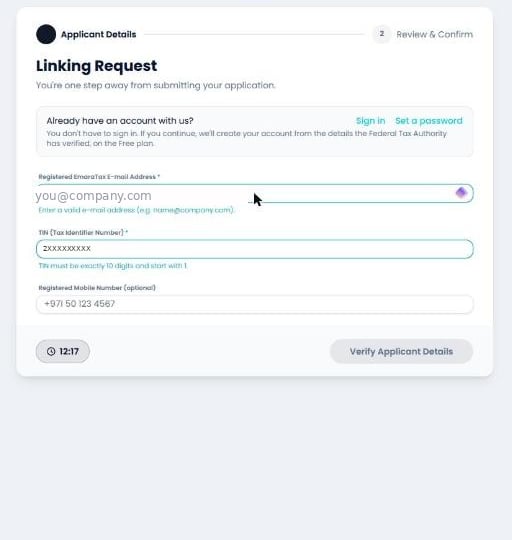
Most linking problems are one of a handful of things. Find the message you’re seeing
below.
”Invalid Email Id.” — FTA code 403
What it means. The e-mail address you entered isn’t the one the FTA holds for
this TIN. The FTA checked it and refused — this is its answer, passed straight
through to you.
What to do. Use the address registered against the taxable person in EmaraTax.
If you’re not sure what it is, check the taxable person’s profile in EmaraTax, or
update it there first and then retry the link.
Our own field validation can only check that an address is well formed. Whether it
is the right address is something only the FTA can answer, which is why this error
appears after you select Verify Applicant Details rather than as you type.
”TIN is already linked with an ASP.” — FTA code 200
What it means. This TIN already has an active link — to us or to another
accredited service provider. A TIN can only be linked to one provider at a time.
What to do. Check the Linkage Status with ASP tab in EmaraTax to see who
it’s linked to. To move to Fatorly, delink from the current
provider first, then onboard again.
A gateway error mentioning GSB_003
What it means. The FTA’s own gateway was temporarily unable to service the
request. It is not a problem with your details, and nothing was submitted.
What to do. Retry. The error is retryable by design — your entered values
are preserved and the Verify button stays live, so you can simply select it
again. If it persists past a few minutes, come back a little later or
contact support.
Your session expired
What it means. Linking sessions last 15 minutes — there’s a countdown in the
bottom-left corner of the wizard. Yours ran out.
What to do. Nothing is lost and nothing was half-submitted. Go back to EmaraTax
and start a fresh linking request.
It’s disabled, and it stays disabled until every field passes format validation.
Check for an inline error message under the fields:
”Missing request” when you open the wizard
You reached /onboarding directly instead of being handed over by EmaraTax. The
wizard needs the secure, single-use request that EmaraTax creates. Start from
EmaraTax → E-INVOICING — see Onboarding.
My reverification didn’t change anything in EmaraTax
That is correct and expected. See Why EmaraTax looks unchanged
afterwards.
Still stuck?
Contact support with your TIN and the exact message
on screen — including any reference ID a gateway error quotes. That reference lets
us trace the specific call.