> ## Documentation Index
> Fetch the complete documentation index at: https://docs.fatorly.com/llms.txt
> Use this file to discover all available pages before exploring further.
# Company Configuration
> The tabbed hub for your company's profile, branding, numbering, team, and account settings — and how to edit the General company details.
**Company Configuration** is the hub for everything about the company you're
working in. Open it from **Company → Company Configuration** in the sidebar
(route `/settings/company-profile`). It's organised as a set of **tabs** along the
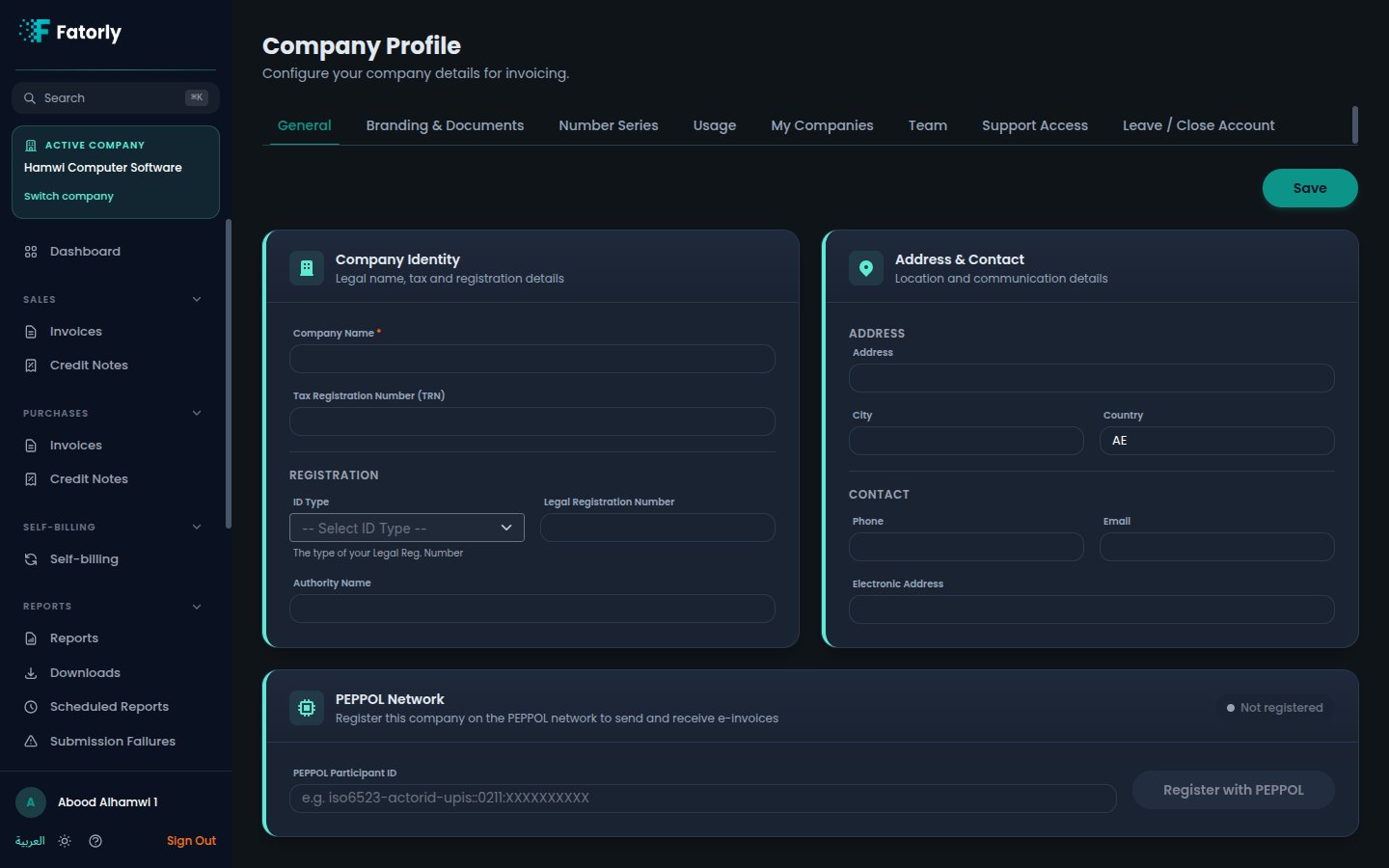
top — this page covers the hub and its **General** tab, where you edit your legal
and contact details.
 ## The tabs
The tabs you see depend on your role — some are hidden from auditors, and a few
are only available to a company admin.
| Tab | What it's for |
| ------------------ | ------------------------------------------------------------------------------------------------------------------------- |
| **General** | Legal name, TRN, registration, address, and contact (this page). |
| **Branding** | Logo, brand colour, and what appears on generated documents. See [Branding & Documents](/en/settings/branding-documents). |
| **Number Series** | Document numbering. See [Number Series](/en/settings/number-series). |
| **Usage** | Document counts and plan usage. See [Usage & Statistics](/en/settings/usage). |
| **My Companies** | Companies you have access to. See [Linking Companies](/en/settings/linking-companies). |
| **Team** | Members and auditors. See [Team & Auditors](/en/settings/team-auditors). |
| **Support Access** | Approve temporary support access. See [Support Access](/en/settings/support-access). |
| **Leave** | Request to leave Fatorly. See [Leave Fatorly](/en/settings/leave-fatorly). |
**Number Series** and **Usage** are hidden for auditor (read-only) accounts, and
**Team**, **Support Access**, and **Leave** are available only to a company
administrator. If you don't see a tab, your role doesn't include it.
## General — company details
The **General** tab holds the legal, tax, and contact details that appear on your
invoices and on the e-invoices you exchange over the network.
### Company identity
| Field | Required | Description |
| ----------------------------- | -------- | ----------------------------------------------------------------------------------------------------------------------------- |
| Company Name | Yes | Your legal company name. |
| Tax Registration Number (TRN) | No | Your VAT `TRN`. |
| ID Type | No | Type of your legal registration number (e.g. EID — Emirates ID). |
| Legal Registration Number | No | Your legal registration / licence number. |
| Authority Name | No | The issuing authority. |
| Company Legal Form | No | Your company's legal form, e.g. "Merchant", "LLC" (IBT-033). This value is automatically included on every invoice you issue. |
### Address & contact
Address, City, Country (defaults to `AE`), Phone, Email, and **Electronic
Address** (used for network routing).
Update any field on the General tab.
Select **Save** to apply the changes.
Keep your `TRN`, legal registration, and electronic address accurate — they
appear on compliant e-invoices and affect delivery on the network.
## Related
* [Branding & Documents](/en/settings/branding-documents) — logo and document appearance.
* [Number Series](/en/settings/number-series) — document numbering.
* [Team & Auditors](/en/settings/team-auditors) — invite members and link auditors.
* [Your Profile](/en/account/profile) — your personal account settings.
* [Switching Companies](/en/multi-company/switching-companies) — move between companies.
## The tabs
The tabs you see depend on your role — some are hidden from auditors, and a few
are only available to a company admin.
| Tab | What it's for |
| ------------------ | ------------------------------------------------------------------------------------------------------------------------- |
| **General** | Legal name, TRN, registration, address, and contact (this page). |
| **Branding** | Logo, brand colour, and what appears on generated documents. See [Branding & Documents](/en/settings/branding-documents). |
| **Number Series** | Document numbering. See [Number Series](/en/settings/number-series). |
| **Usage** | Document counts and plan usage. See [Usage & Statistics](/en/settings/usage). |
| **My Companies** | Companies you have access to. See [Linking Companies](/en/settings/linking-companies). |
| **Team** | Members and auditors. See [Team & Auditors](/en/settings/team-auditors). |
| **Support Access** | Approve temporary support access. See [Support Access](/en/settings/support-access). |
| **Leave** | Request to leave Fatorly. See [Leave Fatorly](/en/settings/leave-fatorly). |
**Number Series** and **Usage** are hidden for auditor (read-only) accounts, and
**Team**, **Support Access**, and **Leave** are available only to a company
administrator. If you don't see a tab, your role doesn't include it.
## General — company details
The **General** tab holds the legal, tax, and contact details that appear on your
invoices and on the e-invoices you exchange over the network.
### Company identity
| Field | Required | Description |
| ----------------------------- | -------- | ----------------------------------------------------------------------------------------------------------------------------- |
| Company Name | Yes | Your legal company name. |
| Tax Registration Number (TRN) | No | Your VAT `TRN`. |
| ID Type | No | Type of your legal registration number (e.g. EID — Emirates ID). |
| Legal Registration Number | No | Your legal registration / licence number. |
| Authority Name | No | The issuing authority. |
| Company Legal Form | No | Your company's legal form, e.g. "Merchant", "LLC" (IBT-033). This value is automatically included on every invoice you issue. |
### Address & contact
Address, City, Country (defaults to `AE`), Phone, Email, and **Electronic
Address** (used for network routing).
Update any field on the General tab.
Select **Save** to apply the changes.
Keep your `TRN`, legal registration, and electronic address accurate — they
appear on compliant e-invoices and affect delivery on the network.
## Related
* [Branding & Documents](/en/settings/branding-documents) — logo and document appearance.
* [Number Series](/en/settings/number-series) — document numbering.
* [Team & Auditors](/en/settings/team-auditors) — invite members and link auditors.
* [Your Profile](/en/account/profile) — your personal account settings.
* [Switching Companies](/en/multi-company/switching-companies) — move between companies.