> ## Documentation Index
> Fetch the complete documentation index at: https://docs.fatorly.com/llms.txt
> Use this file to discover all available pages before exploring further.
# Reverification
> Refresh your registration details with Fatorly without changing your FTA link.
Reverification asks the FTA for a fresh copy of your registration details and
updates what we hold. **It does not change your link** — you stay linked to
Fatorly throughout, and nothing about your Peppol routing changes.
Use it whenever your taxable-person profile changes at the FTA — a new legal name,
a VAT registration, a change of registered e-mail. The FTA recommends reverifying at
least once or twice a year, and whenever something significant changes.
## How to reverify
Open **E-INVOICING** for your taxable person and go to the **Linkage Status with
ASP** tab. On your **Linked** row, open the **Action** menu and choose
**Offboarding/Reverify**.
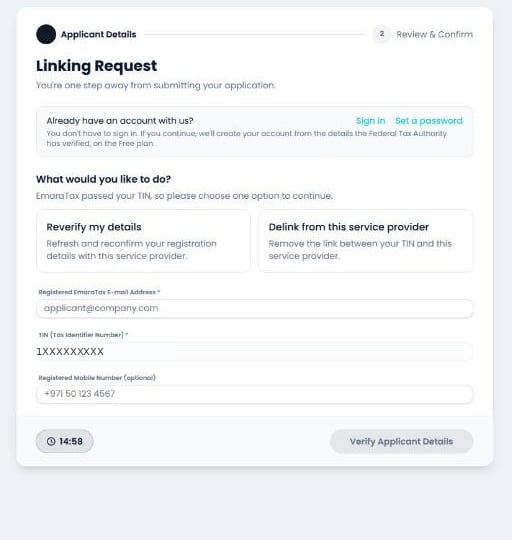
 The wizard opens on a choice between reverifying and delinking. Your **TIN is
already filled in and locked** — it comes from EmaraTax and cannot be changed.
The wizard opens on a choice between reverifying and delinking. Your **TIN is
already filled in and locked** — it comes from EmaraTax and cannot be changed.
 Select **Reverify my details**.
A mandatory **Reason** field appears. Fill it in, along with the e-mail address
the FTA holds for you.
Select **Reverify my details**.
A mandatory **Reason** field appears. Fill it in, along with the e-mail address
the FTA holds for you.
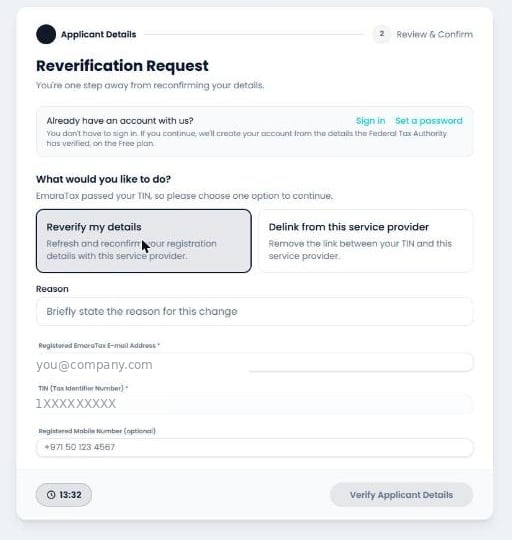 Then select **Verify Applicant Details**.
The FTA returns your current details, filled in and non-editable, on a **Review &
Confirm Reverification** screen. Tick the confirmation checkbox and submit.
Then select **Verify Applicant Details**.
The FTA returns your current details, filled in and non-editable, on a **Review &
Confirm Reverification** screen. Tick the confirmation checkbox and submit.
 ## Why EmaraTax looks unchanged afterwards
This surprises people, so it's worth stating plainly:
**A successful reverification deliberately leaves the EmaraTax registry alone.** It
does not add a Linkage Status row, and it does not move the Status Date. Your row
still reads **Linked**, with the date of the *original* linking.
## Why EmaraTax looks unchanged afterwards
This surprises people, so it's worth stating plainly:
**A successful reverification deliberately leaves the EmaraTax registry alone.** It
does not add a Linkage Status row, and it does not move the Status Date. Your row
still reads **Linked**, with the date of the *original* linking.
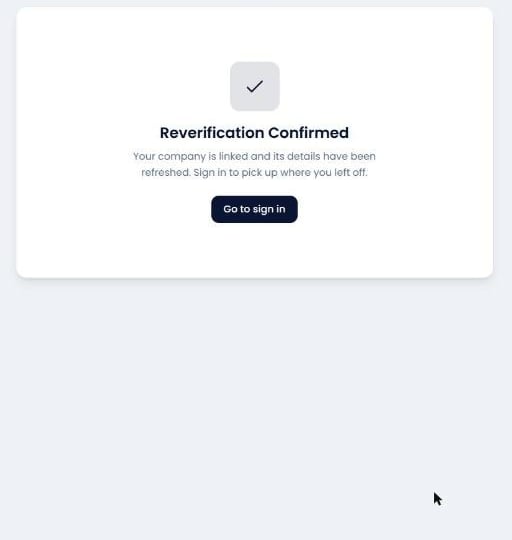
 That is the expected outcome, not a failed update. Reverification refreshes the
**details your provider holds**; the *linkage* itself was never in question, so
there is nothing for the registry to record. If you want to confirm the refresh
landed, check your company profile in Fatorly rather than the EmaraTax row.
That is the expected outcome, not a failed update. Reverification refreshes the
**details your provider holds**; the *linkage* itself was never in question, so
there is nothing for the registry to record. If you want to confirm the refresh
landed, check your company profile in Fatorly rather than the EmaraTax row.