> ## Documentation Index
> Fetch the complete documentation index at: https://docs.fatorly.com/llms.txt
> Use this file to discover all available pages before exploring further.
# Offboarding (delinking)
> Remove the link between your TIN and Fatorly — because you're closing, or moving to another provider.
Offboarding removes the link between your TIN and Fatorly. Use it if you're moving
to another accredited service provider, or if the business is closing.
Delinking stops your e-invoicing through Fatorly. On confirmation we also remove
your business from our Peppol routing, so **you can no longer send or receive
documents through us** — invoices addressed to you will not arrive here.
This is different from [Leave Fatorly](/en/settings/leave-fatorly), which closes your
Fatorly *account*. Offboarding ends the *FTA link*. If you're moving provider you
will usually want both — and you can [download your data](/en/settings/leave-fatorly)
at any time, before or after.
## How to delink
Open **E-INVOICING**, go to **Linkage Status with ASP**, and choose
**Offboarding/Reverify** from the Action menu on your linked row.
On the wizard's landing page, select **Delink from this service provider**. As
with reverification, your TIN is pre-filled and locked.
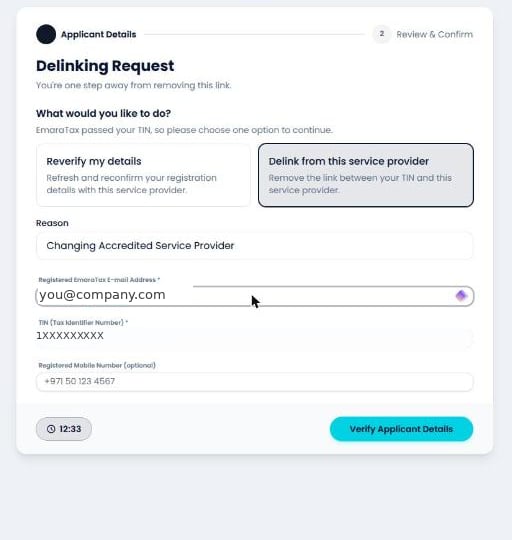
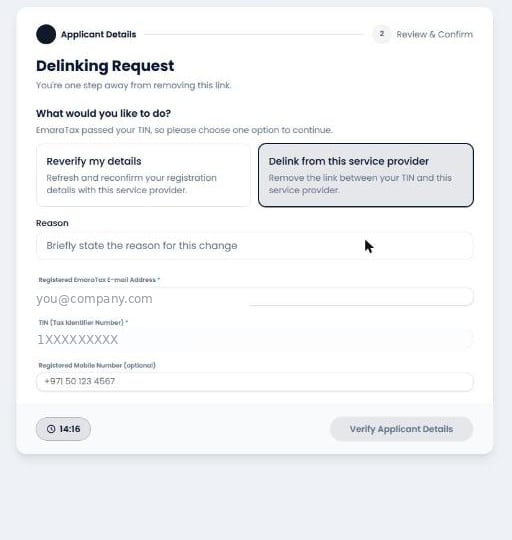 Both are mandatory. **Verify Applicant Details** stays greyed out until the
e-mail is a valid address and the reason is filled in.
Both are mandatory. **Verify Applicant Details** stays greyed out until the
e-mail is a valid address and the reason is filled in.
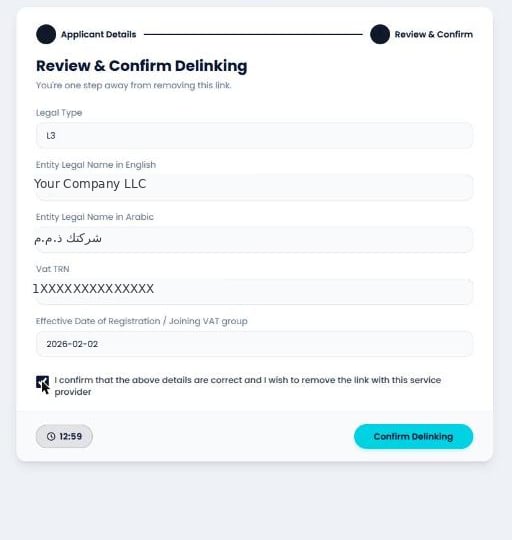
 The FTA returns your details on a **Review & Confirm Delinking** screen. This
step has its own, separate consent — *"I confirm that the above details are
correct and I wish to remove the link with this service provider"* — and
**Confirm Delinking** stays disabled until you tick it.
The FTA returns your details on a **Review & Confirm Delinking** screen. This
step has its own, separate consent — *"I confirm that the above details are
correct and I wish to remove the link with this service provider"* — and
**Confirm Delinking** stays disabled until you tick it.
 ## What happens next
* Your **EmaraTax row changes to De-Linked**, with the date of the delink. Unlike
reverification, this *is* recorded in the registry.
* We remove your business from our Peppol service metadata and Access Point routing.
* Your Fatorly account and its data are not deleted by this action. To close the
account as well, see [Leave Fatorly](/en/settings/leave-fatorly).
## What happens next
* Your **EmaraTax row changes to De-Linked**, with the date of the delink. Unlike
reverification, this *is* recorded in the registry.
* We remove your business from our Peppol service metadata and Access Point routing.
* Your Fatorly account and its data are not deleted by this action. To close the
account as well, see [Leave Fatorly](/en/settings/leave-fatorly).
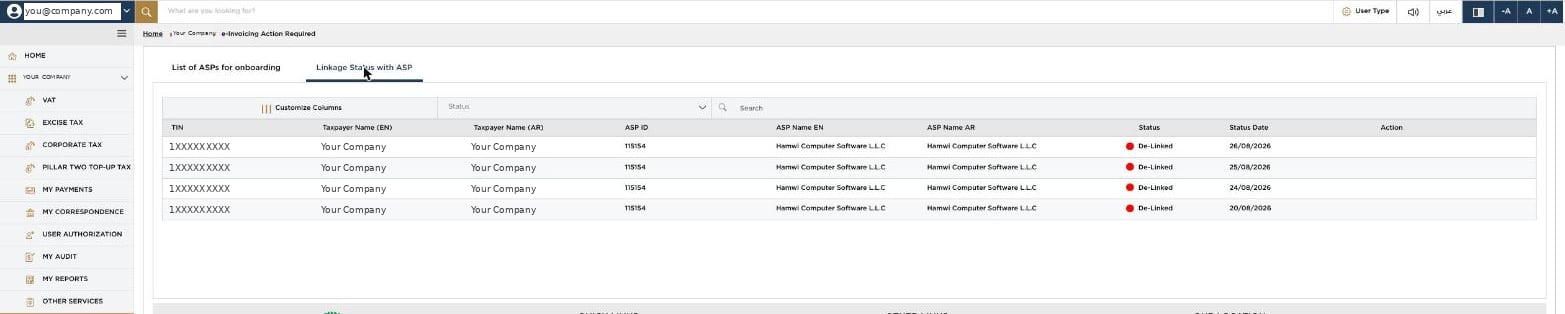 Once every row reads **De-Linked** and the **Action** column is empty, the taxpayer
is fully offboarded and free to onboard with another provider — or with us again.
## Coming back, or moving on
Onboarding again — with Fatorly or anyone else — is just
[the ordinary onboarding flow](/en/fta-linking/onboarding). Your TIN is free to link
the moment the delink is confirmed, and your Peppol identity is derived from that
same TIN, so it comes back with you.
Once every row reads **De-Linked** and the **Action** column is empty, the taxpayer
is fully offboarded and free to onboard with another provider — or with us again.
## Coming back, or moving on
Onboarding again — with Fatorly or anyone else — is just
[the ordinary onboarding flow](/en/fta-linking/onboarding). Your TIN is free to link
the moment the delink is confirmed, and your Peppol identity is derived from that
same TIN, so it comes back with you.